Security Fundamentals: RBAC, Roles & API Keys
Complete step-by-step guide to configuring DreamFactory's layered security model for AI agents, including role creation, service access permissions, table and field restrictions, API key management, and security best practices.
01 🔐 Security Architecture Overview
The Security Pipeline
Every API request to DreamFactory passes through a multi-layer security pipeline before reaching your data:
AI Agent / MCP Client
    │
    ▼
┌─────────────────────────┐
│  1. API Key Validation  │  ← Is this a valid, active key?
├─────────────────────────┤
│  2. Role Resolution     │  ← Which role is attached to this key?
├─────────────────────────┤
│  3. Service Access      │  ← Can this role access this service?
├─────────────────────────┤
│  4. Component Access    │  ← Can this role access this table?
├─────────────────────────┤
│  5. Field Filtering     │  ← Which columns are visible?
├─────────────────────────┤
│  6. Row-Level Filters   │  ← Are there server-side filters?
└─────────────────────────┘
    │
    ▼
  Database Response (filtered)
If any layer denies access, the request fails immediately with a 403 Forbidden response. The AI agent never sees data it isn't authorized to access. There's no client-side filtering or honor system.
Default Deny Principle
Default Deny
DreamFactory operates on a default-deny basis. If a role doesn't explicitly grant access to a service, table, or field, the request is denied. This is critical for AI safety because an unconfigured role cannot accidentally expose data.
02 🏗️ Understanding RBAC in DreamFactory
DreamFactory's Role-Based Access Control (RBAC) maps closely to enterprise identity patterns. Every permission decision flows through a structured hierarchy of roles, services, and components.
Core Concepts
| Concept | Definition | Example |
|---|---|---|
| Role | A named permission set that defines what actions are allowed | ai-agent, analyst-readonly, admin |
| Service | A data source connected to DreamFactory | MySQL, PostgreSQL, S3, Email |
| Component | A specific resource within a service | Table, stored procedure, file path |
| Access Level | HTTP verbs allowed for the component | GET, POST, PUT, PATCH, DELETE |
| API Key | An authentication token bound to a single role | df_ak_7f3e8a91... |
| Lookup Key | Additional key-value pairs attached to a role for runtime filtering | department=sales, region=west |
How Roles Map to AI Tools
When you connect Claude Desktop, ChatGPT, or any MCP client to DreamFactory, the connection authenticates with an API key. That key is bound to a role. The role determines everything the AI can do: which databases it can query, which tables it can see, which fields are returned, and whether it can read, write, or both.
One Role Per Use Case
Create separate roles for each AI use case. A "customer-support-ai" role might need read access to customers and orders, while an "analytics-ai" role might need read access to sales and inventory. Never use a single catch-all role.
03 ⚙️ Creating Roles
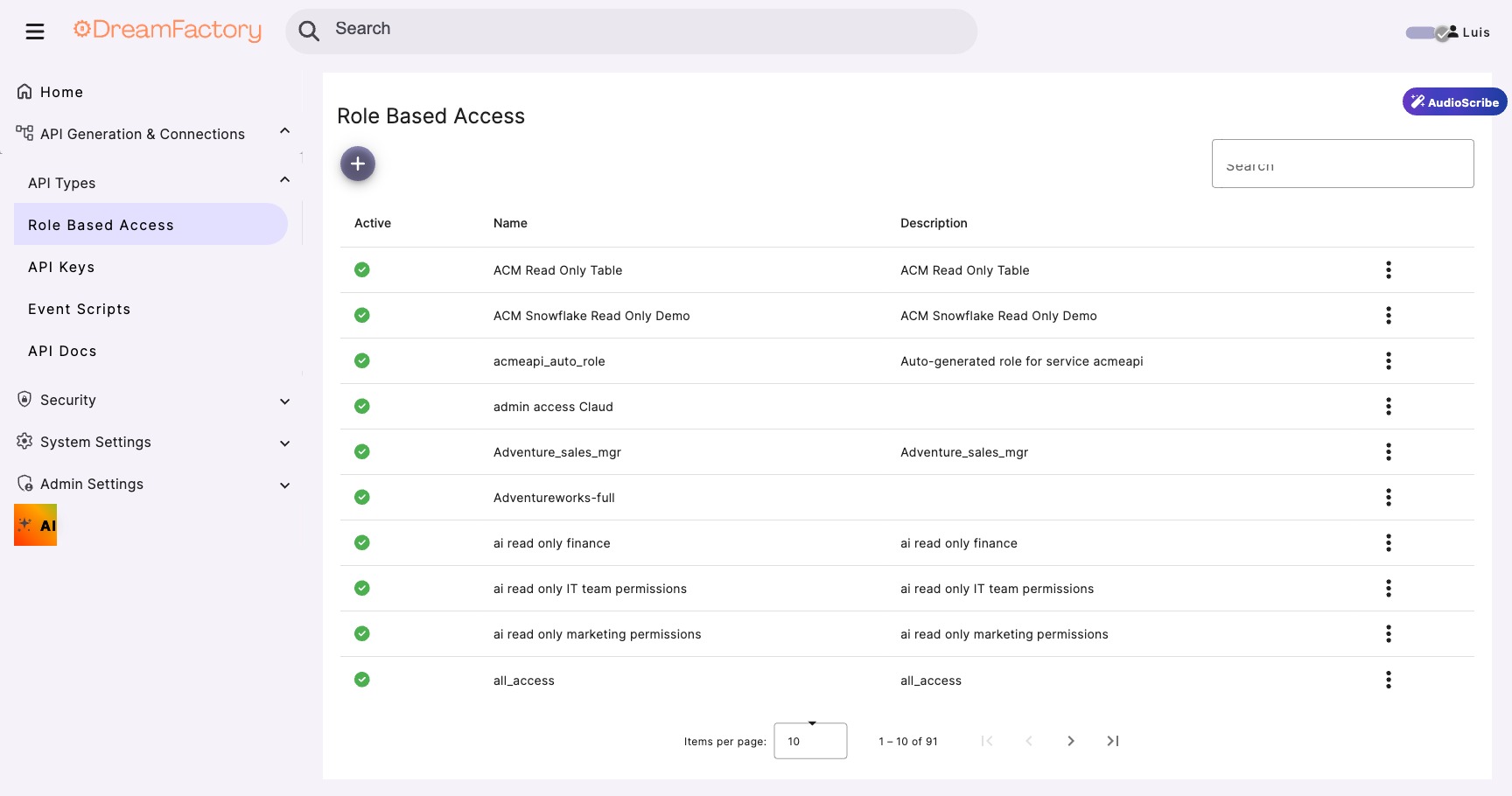
Navigate to Role Management
- Log into the DreamFactory admin panel
- Go to the Roles tab in the left navigation
- Click "Create" to start a new role
Configure Role Properties
Role Name:        ai-readonly-agent
Description:      Read-only access for MCP-connected AI tools
Active:           ✓ (checked)
Assign Role Access
The Role Access tab is where you define which services and components the role can reach. This is the heart of DreamFactory's RBAC system and is covered in detail in the next section.
Naming Conventions
Role names should be descriptive and follow a naming convention. Consider prefixes like ai- for AI agent roles, app- for application roles, and admin- for administrative roles.
04 🔧 Service Access Permissions
The Service-Component-Verb Matrix
Service access is configured as a matrix of three dimensions: Service (which data source), Component (which resource within that service), and HTTP Verbs (what operations are allowed). Every combination must be explicitly granted.
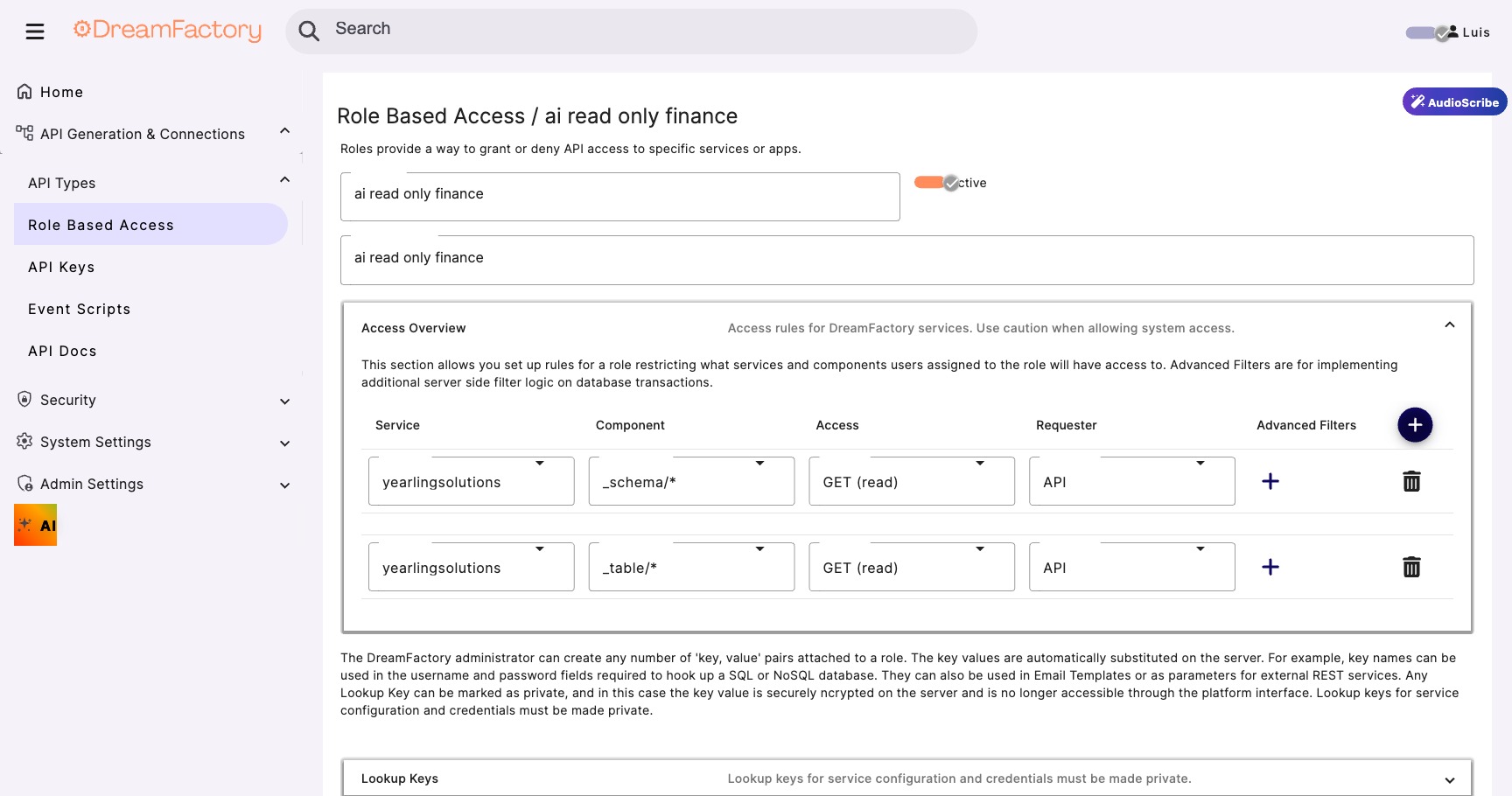
┌──────────────────────────┬───────────────────────┬─────────────────────┐
│ Service                  │ Component             │ Access              │
├──────────────────────────┼───────────────────────┼─────────────────────┤
│ mysql_production         │ _table/customers      │ GET                 │
│ mysql_production         │ _table/orders         │ GET                 │
│ mysql_production         │ _table/products       │ GET                 │
│ mysql_production         │ _proc/get_summary     │ GET, POST           │
│ aws_s3_reports           │ *                     │ GET                 │
├──────────────────────────┼───────────────────────┼─────────────────────┤
│ mysql_production         │ _table/users          │ ✗ (no access)       │
│ mysql_production         │ _table/audit_logs     │ ✗ (no access)       │
│ email_service            │ *                     │ ✗ (no access)       │
└──────────────────────────┴───────────────────────┴─────────────────────┘
Wildcard Access
Using * as the component grants access to ALL resources within a service. For AI roles, avoid wildcards and explicitly list the tables the AI should access. This prevents new tables from being automatically exposed when added to the database.
Never Use Wildcards for AI Roles
Never use wildcard component access for AI agent roles. When new tables are added to a database, a wildcard role will automatically have access to them. Always explicitly list permitted tables.
05 📋 Table & Field Restrictions
Field-Level Access Control
Within each table, you can specify exactly which fields (columns) the AI can see. This is where data minimization happens, as the AI receives only the columns it needs to fulfill its purpose.
Table: customers
┌────────────────────┬────────────┐
│ Field              │ Access     │
├────────────────────┼────────────┤
│ id                 │ ✓ Visible  │
│ first_name         │ ✓ Visible  │
│ last_name          │ ✓ Visible  │
│ company            │ ✓ Visible  │
│ city               │ ✓ Visible  │
│ state              │ ✓ Visible  │
│ country            │ ✓ Visible  │
│ email              │ ✗ Hidden   │
│ phone              │ ✗ Hidden   │
│ ssn                │ ✗ Hidden   │
│ credit_card        │ ✗ Hidden   │
│ date_of_birth      │ ✗ Hidden   │
│ internal_notes     │ ✗ Hidden   │
└────────────────────┴────────────┘
Less Data = Smaller Attack Surface
Think about what the AI actually needs. For a customer support chatbot, the AI needs names and order details, not SSNs, credit cards, or internal notes. Less data exposed = smaller attack surface AND lower token costs.
Server-Side Filters
DreamFactory supports server-side filters that automatically apply WHERE clauses to every query made through a role. These filters are enforced at the platform level, and the AI cannot bypass or override them.
For example, applying a filter of status = 'active' ensures the AI never sees deleted or inactive records, regardless of how the request is constructed. This is particularly useful for:
- Hiding soft-deleted records from AI agents
- Restricting data to a specific tenant in multi-tenant applications
- Limiting results to a specific geographic region or department
- Filtering out draft, pending, or embargoed content
06 🔑 API Key Management
Creating an API Key
API keys are created through the Apps tab in the DreamFactory admin panel. Each key is bound to exactly one role, creating a direct link between authentication and authorization.
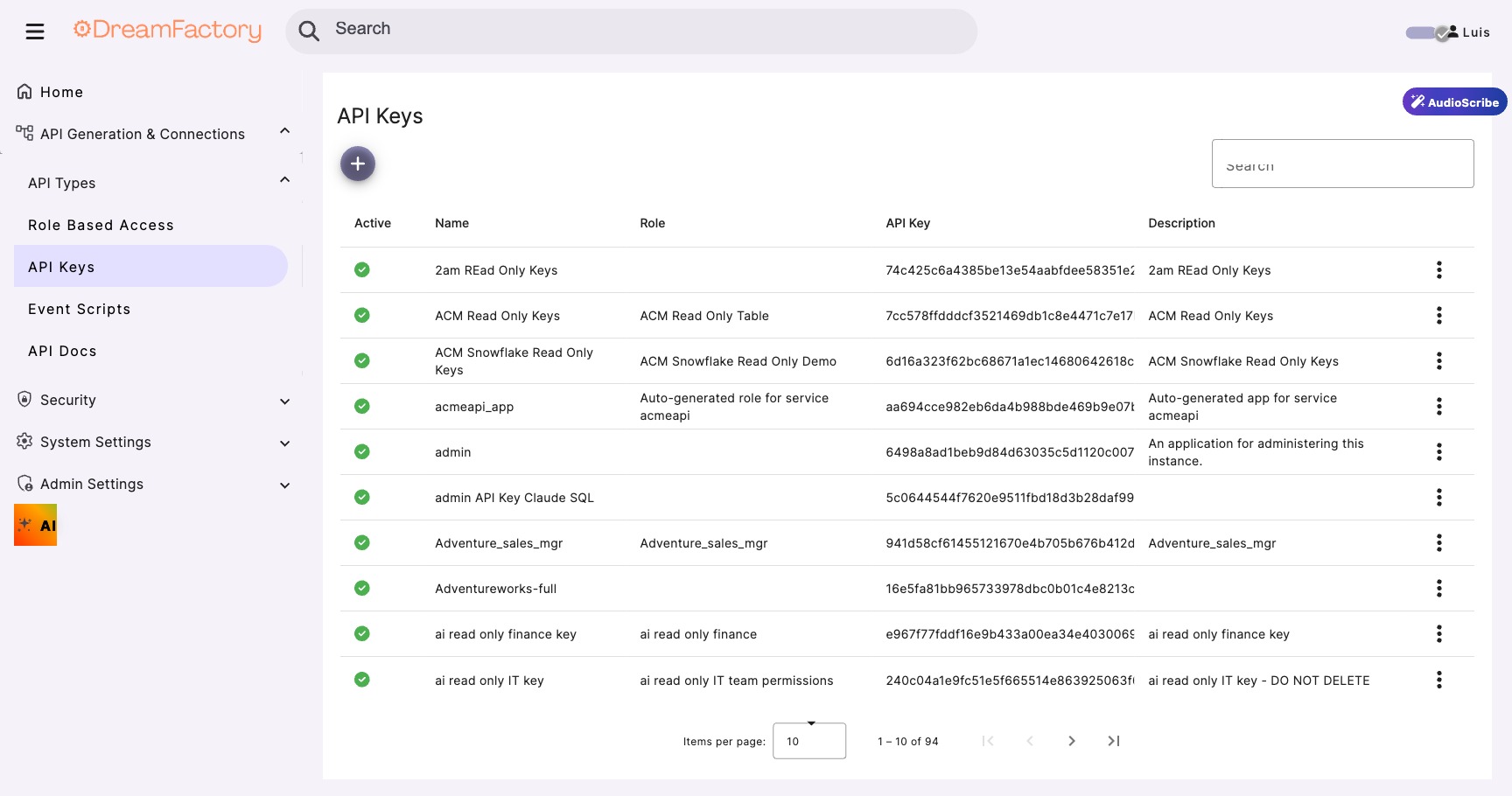
Create a New App
Navigate to the Apps tab, click Create, enter the app details, assign a role, and save to generate the key.
App Name:     Claude MCP Integration
Description:  API key for Claude Desktop via MCP Server
Assign Role:  ai-readonly-agent
API Key:      df_ak_7f3e8a91...  (auto-generated)
One Key Per Tool
Create a separate API key for each AI tool or integration. This is essential for security and observability:
- Claude Desktop gets its own API key
- ChatGPT gets a different API key
- Custom Python scripts get their own keys
- This enables per-tool audit trails and independent key rotation
Key Security Features
| Feature | Description |
|---|---|
| Domain/IP Locking | Restrict which hosts can use this key, preventing stolen keys from being used elsewhere |
| Key Rotation | Generate a new key without changing the role configuration, enabling seamless credential updates |
| Usage Monitoring | Track API calls per key in the admin panel to detect anomalies and usage patterns |
| Instant Revocation | Deactivate a compromised key immediately; the role and other keys remain unaffected |
Treat API Keys Like Passwords
Never embed API keys in client-side code, public repositories, or shared documents. For MCP connections, the key is stored in the MCP client configuration file on the user's machine. Treat it like a password.
07 ⏱️ JWT Configuration
For session-based access such as Identity Passthrough, DreamFactory uses JSON Web Tokens (JWT) to manage authentication state. Understanding these settings is important for securing AI agent sessions.
JWT Settings
| Setting | Default | Description |
|---|---|---|
DF_JWT_TTL |
1440 min (24 hr) | Token lifetime: how long a session token remains valid |
DF_JWT_REFRESH_TTL |
20160 min (14 days) | Refresh window: how long a token can be refreshed after expiry |
DF_JWT_USER_CLAIM |
Claim used for user identity: determines which field identifies the user |
Signing Algorithms
| Algorithm | Type | When to Use |
|---|---|---|
HS256 |
Symmetric (default) | Single-server deployments, simple and fast |
RS256 |
Asymmetric (RSA) | Multi-server deployments, shared validation with public key |
ES256 |
Asymmetric (ECDSA) | Modern deployments, compact tokens with strong security |
JWT TTL for AI Sessions
For AI agent deployments using Identity Passthrough (Module 05), consider reducing DF_JWT_TTL to match your AI session length. A 1-hour token is more appropriate for interactive AI sessions than the 24-hour default.
08 🛡️ Security Best Practices
AI-Specific Security Checklist
- Create dedicated roles for each AI use case, and never reuse admin or user roles
- Use GET-only access unless the AI must write data (and if it must, restrict to specific tables)
- Exclude PII fields by default, and only add them when explicitly needed
- Apply server-side filters to prevent access to inactive, deleted, or draft records
- Generate unique API keys per AI tool for independent audit trails
- Set the MCP pagination limit (1,000 records) to prevent token overflow in AI contexts
- Monitor API key usage weekly, as unusual patterns may indicate misconfiguration or abuse
- Document your role configurations and include them in your security review process
- Test new roles with the DreamFactory API Docs (Swagger UI) before connecting AI tools
- Review permissions after schema changes, as new tables and columns need explicit grants
Compliance Mapping
RBAC Meets Compliance
DreamFactory's RBAC maps directly to common compliance requirements:
GDPR Article 25 (Data minimization by design): field-level restrictions ensure the AI only sees what it needs.
HIPAA Minimum Necessary Rule (Limit access to what's needed): role-based service and table access enforces minimum necessary.
FedRAMP AC-3/AC-6 (Access enforcement and least privilege): the default-deny model and explicit grants satisfy these controls.
SOC 2 CC6.1/CC6.3 (Logical and physical access controls): API key management and role-based permissions provide auditable logical access controls.