Connect Local AI to Enterprise Databases
Complete step-by-step guide to building an AI-powered data summarization endpoint using DreamFactory, stored procedures, and a local or cloud LLM.
🎯 Overview
In this tutorial, you'll build a complete AI-powered API endpoint that retrieves data from your enterprise database, sends it to an LLM for processing, and returns an AI-generated summary, all through DreamFactory's secure API layer.
What You'll Build
By the end of this guide, you'll have a working endpoint that:
- Accepts a record identifier (customer ID, ticket number, order ID, etc.)
- Retrieves relevant data via a secure stored procedure
- Sends that data to your AI model with a structured prompt
- Returns an AI-generated summary in a clean JSON response
Workflow Overview
Real-World Performance
Enterprise teams running this pattern in production report:
| Configuration | Response Time | Notes |
|---|---|---|
| GPT-4o mini (cloud) | 4-16 seconds | Fastest option, requires internet |
| Llama 3.1 14B (local) | ~25-32 seconds | On NVIDIA DGX, fully air-gapped |
| Llama 3.1 120B (local) | ~45-60 seconds | Higher quality, slower inference |
Smaller Models Can Outperform Larger Ones
One enterprise team discovered their 14B parameter model actually produced better summaries than their 120B model. The smaller model focused on language and context without "overthinking." Always benchmark your specific use case.
📋 Prerequisites
Required
Recommended Knowledge
- Basic SQL and stored procedure concepts
- REST API fundamentals
- Python basics (for scripted service)
- JSON structure and manipulation
Time Estimate
| Step | Time |
|---|---|
| Database service setup | 5 min |
| Create stored procedure | 10 min |
| HTTP service for AI | 5 min |
| Scripted service (orchestration) | 15 min |
| Testing & debugging | 10 min |
| Total | ~45 min |
🏗️ Architecture
This integration uses three DreamFactory services working together:
Service Overview
| Service Type | Purpose | Example Name |
|---|---|---|
| Database Service | Connects to your enterprise database and exposes stored procedures | MainDatabase |
| HTTP Service | Connects to your AI model's API endpoint | LocalAI |
| Scripted Service | Python script that orchestrates the flow between database and AI | AISummary |
Data Flow Diagram
Figure 1: High-level architecture showing the data flow from client request to AI-generated response
Why Three Services?
Separating concerns into distinct services provides flexibility. You can swap AI providers, change databases, or modify the orchestration logic independently without affecting other components.
Step 1 Configure Database Service
First, we'll connect DreamFactory to your database. If you already have a database service configured, skip to Step 2.
Create New Database Service
- Log into your DreamFactory admin panel
- Navigate to Services → Create
- Select Database → Choose your database type (e.g., SQL Server, PostgreSQL)
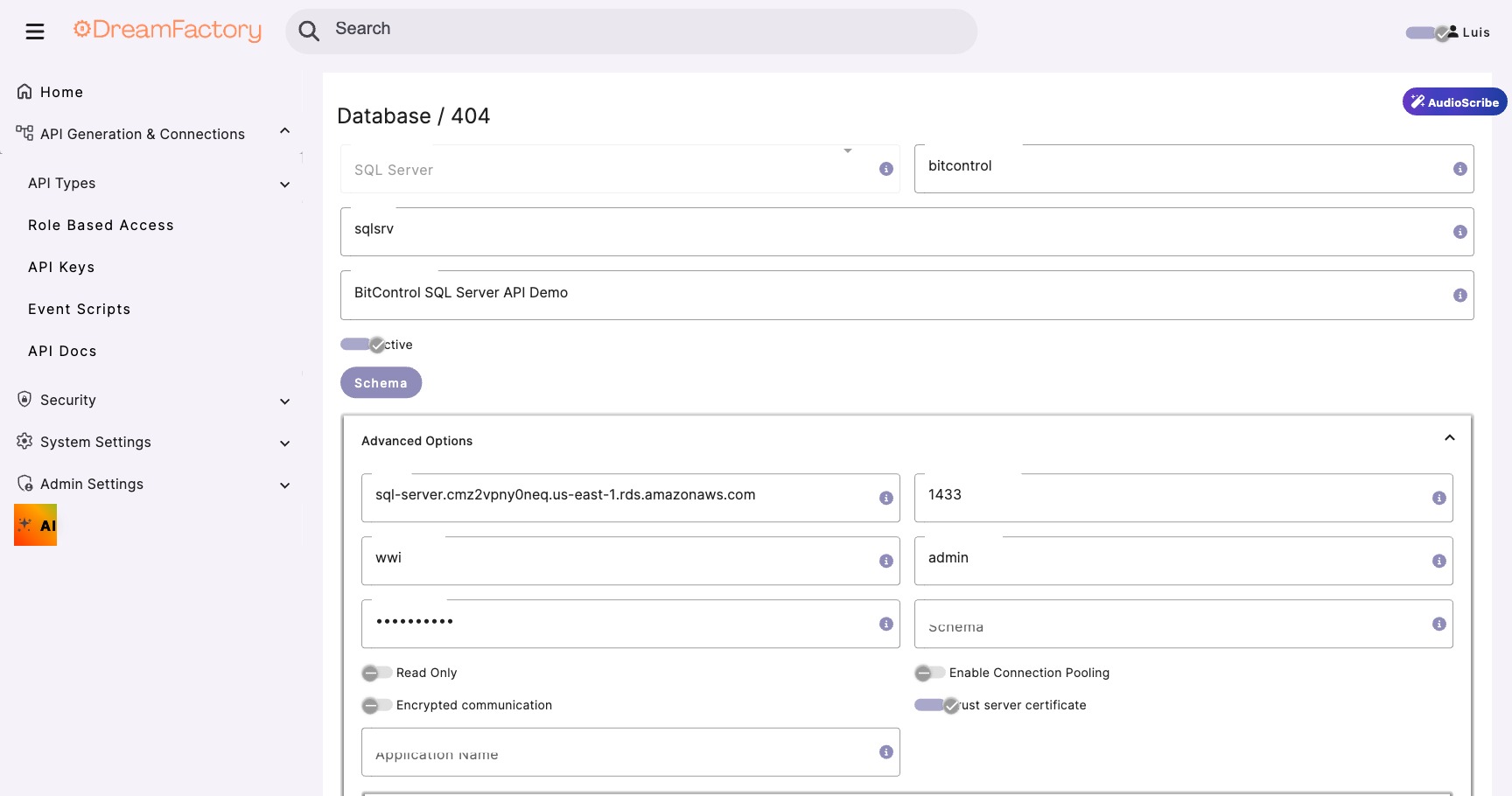
- Fill in the connection details:
| Field | Value | Notes |
|---|---|---|
| Service Name | MainDatabase |
Use a descriptive name |
| Host | your-db-server.local |
Internal hostname or IP |
| Port | 1433 (SQL Server) |
Default port for your DB type |
| Database | YourDatabase |
Target database name |
| Username | df_service_account |
Service account with proc execute rights |
Test the Connection
- Click Test Connection to verify connectivity
- If successful, click Save
- Navigate to API Docs tab to verify the service is accessible
Connection Timeout?
If the connection times out, verify: (1) The database server is accessible from the DreamFactory host, (2) Firewall rules allow the connection, (3) The service account has appropriate permissions.
Step 2 Create Stored Procedure
The stored procedure acts as a security contract that defines exactly what data the AI can access. This is critical for compliance and prevents prompt injection attacks from accessing unauthorized data.
Design the Procedure
Before writing SQL, determine:
- Input parameters: What identifies the record? (ID, username, date range)
- Output fields: What data does the AI need to generate a useful summary?
- Security filters: How do you scope data to the requesting user?
Never Expose Sensitive PII
Do not include SSNs, full credit card numbers, passwords, or other sensitive data in the procedure output. The AI doesn't need this data, and exposing it creates compliance risk.
Create the Procedure
Here's a template stored procedure. Adapt it to your schema:
-- Stored Procedure: GetRecordSummaryData
-- Purpose: Retrieve data for AI summarization
-- Security: Returns only approved fields, user-scoped

CREATE PROCEDURE [dbo].[GetRecordSummaryData]
    @RecordId INT,
    @RequestingUser NVARCHAR(100)
AS
BEGIN
    SET NOCOUNT ON;

    -- Verify user has access to this record
    IF NOT EXISTS (
        SELECT 1 FROM Records r
        INNER JOIN UserAccess ua ON r.DepartmentId = ua.DepartmentId
        WHERE r.Id = @RecordId
        AND ua.Username = @RequestingUser
    )
    BEGIN
        RAISERROR('Access denied', 16, 1);
        RETURN;
    END

    -- Return only the fields needed for AI summary
    SELECT
        r.Id,
        r.Title,
        r.Description,
        r.Category,
        r.Status,
        r.CreatedDate,
        r.LastModified,
        -- Aggregate related data
        (
            SELECT COUNT(*)
            FROM Comments c
            WHERE c.RecordId = r.Id
        ) AS CommentCount,
        -- Include recent activity summary
        (
            SELECT TOP 5
                a.ActionType + ': ' + a.Description
            FROM ActivityLog a
            WHERE a.RecordId = r.Id
            ORDER BY a.Timestamp DESC
            FOR JSON PATH
        ) AS RecentActivity
    FROM
        Records r
    WHERE
        r.Id = @RecordId
        AND r.Status != 'Draft'  -- Don't expose drafts
END
Test via DreamFactory
- Navigate to API Docs → MainDatabase
- Find _proc/GetRecordSummaryData
- Click Try It Out
- Enter test parameters and execute
Step 3 Configure HTTP Service for AI
Next, we'll create an HTTP service that connects to your AI model. This works with local models (Ollama, vLLM, Text Generation WebUI) or cloud APIs (OpenAI, Anthropic).
Create HTTP Service
- Navigate to Services → Create
- Select HTTP Service
- Configure based on your AI provider:
For Local LLM (Ollama, vLLM, Web UI):
| Field | Value |
|---|---|
| Service Name | LocalAI |
| Base URL | http://your-ai-server:11434 (Ollama default) |
| Headers | Content-Type: application/json |
For OpenAI:
| Field | Value |
|---|---|
| Service Name | OpenAI |
| Base URL | https://api.openai.com/v1 |
| Headers | Authorization: Bearer {your-api-key}Content-Type: application/json |
Critical: Set Timeout to 300 Seconds
LLM inference can take 30-180 seconds depending on model size and prompt length. The default 30-second timeout will cause failures. Set your HTTP service timeout to 300 seconds (5 minutes).
Test the AI Connection
Verify connectivity with a simple test request:
{
  "model": "llama3.1:14b",
  "messages": [
    {
      "role": "user",
      "content": "Say 'Hello from DreamFactory' and nothing else."
    }
  ],
  "max_tokens": 50
}
Send this to /api/v2/LocalAI/chat/completions (or your service name). You should receive a response within 5-10 seconds for this simple prompt.
Step 4 Create Scripted Service (Orchestration)
The scripted service is the "brain" that ties everything together. It receives the client request, calls the stored procedure, formats the data for the AI, and returns the final response.
Create the Service
- Navigate to Services → Create
- Select Script → Python3
- Name it
AISummary - Leave default settings and click Save
Write the Orchestration Script
Navigate to the service's Scripts tab and add this code:
# AISummary Scripted Service
# Orchestrates data retrieval and AI summarization

import json
import urllib.request
import urllib.error

# ─── CONFIGURATION ──────────────────────────────────
BASE_URL = "http://localhost"  # Internal DF URL
API_KEY = event.request.headers.get("X-DreamFactory-Api-Key", "")
AI_MODEL = "llama3.1:14b"  # Or "gpt-4o-mini" for OpenAI

# ─── HELPER FUNCTION ────────────────────────────────
def internal_request(method, url, payload=None, timeout=300):
    """Make internal DreamFactory API call"""
    headers = {
        "X-DreamFactory-Api-Key": API_KEY,
        "Content-Type": "application/json"
    }

    data = json.dumps(payload).encode('utf-8') if payload else None
    req = urllib.request.Request(url, data=data, headers=headers, method=method)

    try:
        with urllib.request.urlopen(req, timeout=timeout) as response:
            return json.loads(response.read().decode('utf-8'))
    except urllib.error.HTTPError as e:
        return {"error": f"HTTP {e.code}: {e.reason}"}
    except Exception as e:
        return {"error": str(e)}

# ─── MAIN LOGIC ─────────────────────────────────────

# 1. Extract request parameters
record_id = event.request.parameters.get("record_id")
requesting_user = event.request.parameters.get("user", "anonymous")

if not record_id:
    raise ValueError("Missing required parameter: record_id")

# 2. Call stored procedure to get data
proc_url = f"{BASE_URL}/api/v2/MainDatabase/_proc/GetRecordSummaryData"
proc_payload = {
    "params": [
        {"name": "RecordId", "value": record_id},
        {"name": "RequestingUser", "value": requesting_user}
    ]
}

proc_result = internal_request("POST", proc_url, proc_payload, timeout=30)

if "error" in proc_result:
    raise Exception(f"Database error: {proc_result['error']}")

if not proc_result or not proc_result.get("resource"):
    raise ValueError("No data found for the specified record")

record_data = proc_result["resource"][0]

# 3. Format prompt for AI
system_prompt = """You are a professional analyst. Summarize the provided data
concisely and highlight key insights. Use bullet points for clarity.
Keep the summary under 200 words."""

user_prompt = f"""Please summarize the following record:

Title: {record_data.get('Title', 'N/A')}
Category: {record_data.get('Category', 'N/A')}
Status: {record_data.get('Status', 'N/A')}
Created: {record_data.get('CreatedDate', 'N/A')}
Description: {record_data.get('Description', 'N/A')}
Comment Count: {record_data.get('CommentCount', 0)}
Recent Activity: {record_data.get('RecentActivity', 'None')}

Provide a concise summary with key insights."""

# 4. Call AI model
ai_url = f"{BASE_URL}/api/v2/LocalAI/chat/completions"
ai_payload = {
    "model": AI_MODEL,
    "messages": [
        {"role": "system", "content": system_prompt},
        {"role": "user", "content": user_prompt}
    ],
    "max_tokens": 500,
    "temperature": 0.3  # Lower = more deterministic
}

ai_result = internal_request("POST", ai_url, ai_payload, timeout=300)

if "error" in ai_result:
    raise Exception(f"AI error: {ai_result['error']}")

# 5. Extract and return summary
summary = ai_result.get("choices", [{}])[0].get("message", {}).get("content", "")

return {
    "record_id": record_id,
    "title": record_data.get("Title"),
    "summary": summary.strip(),
    "model_used": AI_MODEL,
    "generated_at": __import__("datetime").datetime.utcnow().isoformat() + "Z"
}
Why urllib instead of requests?
DreamFactory's Python scripting environment includes urllib by default. Using it with explicit timeouts avoids worker pool deadlock issues that can occur when calling other DF endpoints internally.
Step 5 Testing Your Integration
Test via API Docs
- Navigate to API Docs → AISummary
- Find the GET endpoint
- Add parameters:
record_id=123anduser=testuser - Click Execute
Expected response (after 15-30 seconds):
{
  "record_id": "123",
  "title": "Q4 Sales Report",
  "summary": "**Key Insights:**\n• Record is currently Active with 12 comments\n• Created in Q4 2024, last modified recently\n• High engagement indicated by comment volume\n• Recent activity shows review and approval workflow\n\n**Recommendation:** This record appears to be progressing through standard approval process with healthy stakeholder engagement.",
  "model_used": "llama3.1:14b",
  "generated_at": "2026-02-05T14:32:18Z"
}
Test via cURL
curl -X GET \
  "https://your-dreamfactory.com/api/v2/AISummary?record_id=123&user=testuser" \
  -H "X-DreamFactory-Api-Key: YOUR_API_KEY" \
  -H "Accept: application/json"
🔧 Troubleshooting
Common Issues and Solutions
504 Gateway Timeout
Cause: AI inference took longer than the configured timeout.
Fix: Increase HTTP service timeout to 300 seconds. Also check if your AI model is properly loaded in memory.
500 Internal Server Error on Script
Cause: Python script error, often JSON parsing or missing fields.
Fix: Check DreamFactory logs at /opt/dreamfactory/storage/logs/. Add try/except blocks around each step to isolate the issue.
400 Bad Request: Unknown Parameter
Cause: Parameter name mismatch between local and cloud AI providers.
Fix: Don't include business parameters (like username) in the AI payload. Keep AI requests clean, with only model, messages, max_tokens, etc.
Empty AI Response
Cause: Model not loaded, or response parsing issue.
Fix: Test the AI endpoint directly first. Verify the response structure matches what your script expects (choices[0].message.content).
⚡ Performance Optimization
Response Time Targets
| Component | Target | If Slower, Check... |
|---|---|---|
| Stored Procedure | < 500ms | Missing indexes, complex joins |
| AI Inference (14B local) | 15-30s | GPU memory, model loading |
| AI Inference (cloud) | 10-20s | Network latency, rate limits |
| Total End-to-End | 20-45s | All of the above |
Optimization Strategies
- Reduce prompt size: Only include essential data in the AI prompt
- Use smaller models: 14B often outperforms 120B for summarization tasks
- Pre-warm models: Keep frequently used models loaded in GPU memory
- Cache common queries: Consider caching AI responses for frequently accessed records
- Batch processing: For bulk operations, process records in parallel
🔒 Security Considerations
Key Security Principles
Compliance Ready
This pattern supports HIPAA, GDPR, FedRAMP, and SOC 2 requirements because: exact queries are reviewed before deployment, complete audit trails exist, AI cannot access unauthorized data, and data minimization is enforced by design.